Step 7: Auto Alt-Text Generation - LocalGov Drupal Walkthrough
Automatically generate accessible image descriptions using AI
Great! You've deployed the demo
Now let's walk through what you just deployed and see it in action.
Start WalkthroughChoose your next step
Generate Evidence Pack
Create your business case documentation with what you've learned.
Generate Evidence PackWalkthrough progress
Step 7 of 11 • 3 minutes
Auto Alt-Text Generation
Automatically generate accessible image descriptions using AI when you upload images.
Expected outcome
- You understand how auto alt-text generation works
- You've seen AI generate a description for an uploaded image
- You know the accessibility benefits of proper alt-text
What is Auto Alt-Text Generation?
When you upload an image to the Media Library, Amazon Nova (opens in new tab)'s vision capabilities automatically analyse the image and generate a descriptive alt-text.
Automatic and instant
No extra clicks required. Simply upload an image and the alt-text field is automatically populated with an AI-generated description within seconds.
Why alt-text matters
Alt-text (alternative text) is essential for web accessibility:
- Screen readers read alt-text aloud to visually impaired users
- Search engines use alt-text to understand image content
- Broken images display alt-text when images fail to load
- WCAG compliance requires meaningful alt-text for all informative images
WCAG guideline: Alt-text should be concise (under 125 characters) and describe the image's content or purpose, not just "image of..." or "photo of...".
How to use Auto Alt-Text
-
Go to the Media Library
Click Content > Media > Add media > Image
-
Upload an image
Click "Add a new file" and select an image from your computer
-
Wait for AI analysis
Amazon Nova (opens in new tab) analyses the image and generates alt-text automatically
-
Review and edit if needed
The alt-text field is populated automatically. You can edit it if needed before saving.
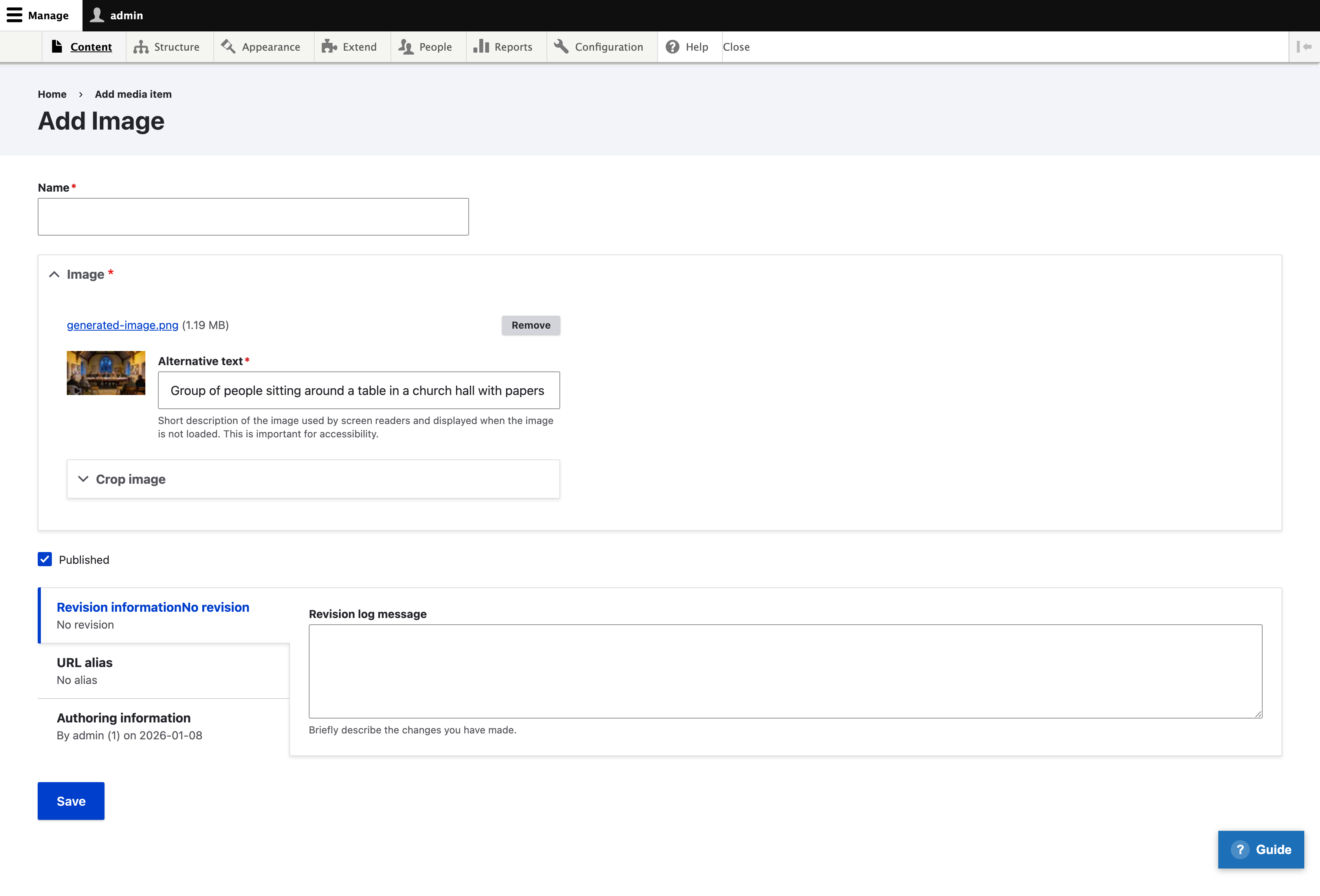
Example: What the AI sees
Here's an example of how the AI describes an image of a council meeting:
AI-generated alt-text:
"Group of people sitting around a table in a church hall with papers"
78 characters Well under the 125 character WCAG recommendation
Best practices
| Do | Don't |
|---|---|
| Review AI-generated alt-text for accuracy | Accept alt-text without checking |
| Add context the AI might miss (names, locations) | Leave generic descriptions when specific ones help |
| Keep alt-text concise and meaningful | Start with "Image of..." or "Photo of..." |
| Use empty alt="" for purely decorative images | Add alt-text to decorative images |
For technical readers
| AWS Service | Purpose |
|---|---|
| Amazon Bedrock (opens in new tab) | Hosts the foundation model for image analysis |
| Amazon Nova (opens in new tab) | Vision model that analyses images and generates descriptions |