Step 1: Find Your Credentials - FixMyStreet Walkthrough
Get the FixMyStreet URL and admin credentials from CloudFormation outputs
Great! You've deployed the demo
Now let's walk through what you just deployed and see it in action.
Start WalkthroughChoose your next step
Generate Evidence Pack
Create your business case documentation with what you've learned.
Generate Evidence PackWalkthrough progress
Step 1 of 6 • 2 minutes
Find Your Credentials
Get your FixMyStreet URL and council admin credentials from the CloudFormation stack outputs.
Expected outcome
- CloudFormation stack shows CREATE_COMPLETE status
- FixMyStreetUrl output is visible in the Outputs tab
- AdminUsername and AdminPassword are noted down
How to find your credentials
-
Open the CloudFormation console
Go to CloudFormation console in us-east-1 (N. Virginia) (opens in new tab)
-
Find your stack
Look for a stack named
ndx-try-fixmystreet-[timestamp]The status should be CREATE_COMPLETE
-
Click on the stack name
This opens the stack details page.
-
Go to the "Outputs" tab
You will see a list of outputs from the deployment.
-
Note down these three values
FixMyStreetUrl: The URL to access FixMyStreet
https://[random-id].cloudfront.netAdminUsername: The council admin email address
AdminPassword: Auto-generated secure password
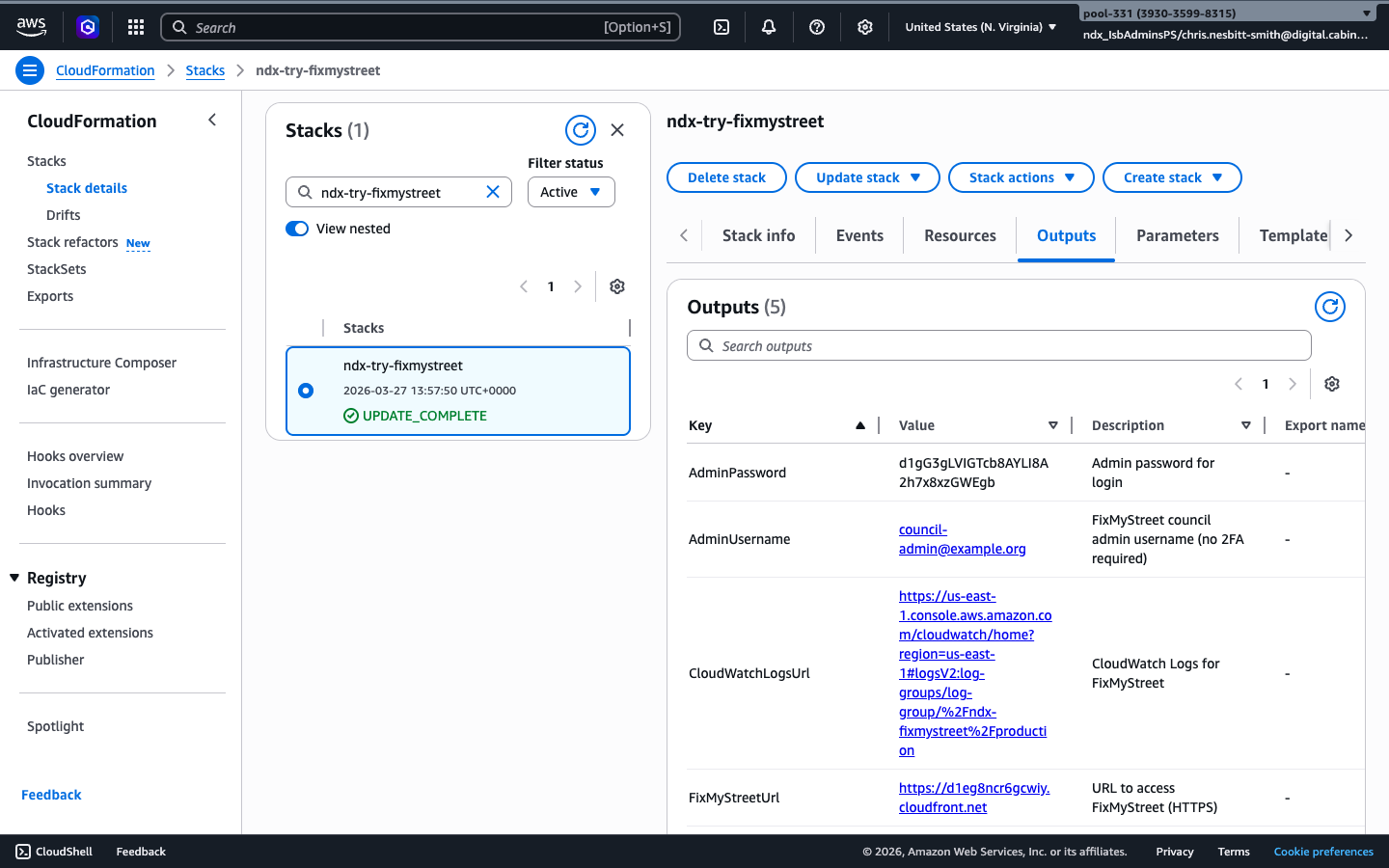
Tip: Keep these credentials handy. You will need them in Step 4 to access the council admin dashboard.
What you should see
When you open the FixMyStreet URL, you should see:
- The FixMyStreet homepage with a search box
- A prompt to enter a postcode or street name
- The NDX Demo Council branding
Troubleshooting: Stack not showing CREATE_COMPLETE
If your stack shows CREATE_IN_PROGRESS:
- Wait 15 to 20 minutes for deployment to complete — this scenario provisions a database, EFS, and Fargate service
- Refresh the CloudFormation console page
- Check the "Events" tab to see deployment progress
If your stack shows CREATE_FAILED or ROLLBACK_COMPLETE:
- Check the "Events" tab to see which resource failed
- Common issues: IAM permissions, service quotas, or region availability
- Try deleting the stack and redeploying
- Contact support if the issue persists
Troubleshooting: Site shows an error or CloudFront error
If the FixMyStreet page shows an error:
- Wait 2 to 3 minutes after stack completion — CloudFront may still be propagating
- Try refreshing the page or opening in a private/incognito window
- Check you are using the correct URL from the Outputs tab
- The Fargate service may still be starting — check the ECS console for task status